Showing posts with label Tutorials. Show all posts

Monday, September 20, 2010

Mozy Home FREE Version 2.2 Review And Tutorial


Saturday, September 4, 2010

Flash - Adobe Flash Tutorial And How I Help Folks Diagnose Their Flash Issues

-----Original Message-----
From: WinTips-Tricks Yahoo Group
Subject: [WinTips-Tricks] Flash Trouble

Hi all,

A friend of mine has an Asus laptop with Vista Home Premium. Lately she has been having trouble with Adobe Flash. For example, going to YouTube and attempting to play a video causes the browser to freeze. Sometimes right-clicking on the task or opening the Task Manager (not even doing anything with tasks) can cause the video to start, but after a second or two, the video and/or audio chokes and stops.

Other sites like WeightWatchers (which has a Flash gizmo at a certain place on its site) just produce an error message that Flash has crashed.

I have tried uninstalling and reinstalling Flash several times, always getting the official uninstaller and the latest version of Flash from Adobe. I have also tried disabling all other plugins in Firefox (IE has the same problem), but to no avail.

Any thoughts on this? I am stumped. Thanks in advance for any assistance.

~pt

My first reply:

Has she updated her Adobe Flash Player? This page, http://www.adobe.com/software/flash/about/ will check your version for you and tell you if it's the latest version on the chart below. If you don't have the latest version, it should be updated as Adobe Flash is a common add-on that is attacked by hackers.

Same with Java. Java can be easily updated through the Java Applet in the Control Panel on your computer.

I use Secunia Online Scanner to check most of the common programs (Flash, Java, IM programs, Media Players, etc.) on computers to see if they have the latest, most secure versions. http://secunia.com/vulnerability_scanning/online/  Once you do the first scan, it will offer to email you each time new definitions come out and you can run the scan again. I like Secunia as it will also give you the file path to any OLD remnant .exe files of programs that were left behind by a previous uninstall, so you can manually remove those remnant .exe files. This is common with Adobe and can cause the problems you are seeing. Adobe also offers a clean-up tool on their site for removing the remnant files it's uninstaller leaves behind.

Have they cleaned out their Flash Cookies? CCleaner, Spybot and I'm sure other security/cleaning programs will also clean out Flash cookies. I have a blog page on how I use CCleaner since I don't use all of the default settings since I don't want to clean out some of the things it will do as a default. I also use CCleaner to manage all the other cookies that I do allow to stay on my computer.

Do you or your friend know how to set the settings on Adobe Flash to have it run well without giving it too much freedom over your computer?

Last but not least, I use Toggle Flash and turn off Flash except for when I'm on a site that I want to turn it on for, like YouTube, Hulu, etc. Otherwise, I leave Flash turned off so it doesn't cause freeze up problems when wildly surfing the net since many advertisements are based on flash and lots of malware will try attacks through unsecured Flash Players or unsecured browsers. See my blog article and review of Toggle Flash

Lenny Vasbinder

Their follow-up reply:

-----Original Message-----
From: WinTips-Tricks Yahoo Group
On Behalf Of
Subject: [WinTips-Tricks] Re: Flash Trouble

Hi Lenny the Computer Guy,

Thanks for all the tips. I updated her to the latest version of Flash, as per Secunia. Secunia doesn't currently report any outdated or compromised software.

I was unable to find the Adobe program that cleans up old installs. How might I find it?

I installed the Flashblock (to have Flash items on a page disabled by default) and BetterPrivacy (to delete Flash cookies) extensions on Firefox. (Flash seems to be working on IE8 now, btw.) I have also used Adobe's tool to adjust Flash security settings. For good measure I ran CCleaner to delete Flash cookies (as well as over 470 MB of other junk!) and used Eusing's Registry Cleaner to clean up the registry.

However, I continue to have the same issues with YouTube. Any other thoughts?

~pt

My follow-up reply:

If you have Flashblock, I see this is a FireFox (FF) add-on, then that would be blocking the videos with YouTube... and possibly causing it to freeze. It could also be your settings to block flash cookies. I think you have to allow them on most sites that have flash features that you actually want to see. Then use CCleaner or other utility to clean the flash cookies up.

Flash, in and of itself, does cause browser freeze-ups on a regular basis, usually related to malicious ads or flash vids created with old versions or other related problems, which is why I use Toggle Flash in IE8 when doing power surfing. Then if I'm on a page where I do want to see the video or animation, I click the Toggle Flash button on my browser tab's bar, do a refresh on just that page and I'm able to see the video/animation. After I'm done, I click Toggle Flash again so Flash is turned off when I go to the next site.

I only use FF as a backup browser so I'm not as familiar with all of it's tweaks but I know there have been problems with some of the recent updates and most folks had to uninstall FF and then reinstall it to get a clean installation and then re-customize it.

While all of the add-ons are great for some folks, each add-on can also bring it's own unique set of problems in how it plays with the other add-ons or the browser itself. I know that with many other programs, add-ons are almost always the cause of problems with the main program... I'm sure it's the same with FF.

Re-run the Secunia scan and do the "Enable thorough scan..." and if it comes up clean with no old fragments of Flash.exe files, then you shouldn't be having any immediate problems related to Flash itself.

If you still have problems, http://kb2.adobe.com/cps/191/tn_19166.html#main_Uninstall, which should cleanup current and all previous versions... or you can use RevoUninstaller to really do a cleanup of Adobe Flash program and registry entries, then get the latest version here, http://get.adobe.com/flashplayer/ and start from scratch again. That entire page in the first link in this paragraph has LOTS of other info for troubleshooting Flash problems with IE8, FF, etc.

Depending on the users download speed, you may have to go into the Flash Settings (right click on the flash video and choose "Settings" and give it more buffering capacity. For folks that do not have the fastest download speeds but do lots of YouTubing, if they have secure computers, I might give them 10MB of memory on the host computer. For most others, 1MB or less is sufficient. This needs to be tweaked from time to time depending on the situation for folks that use different internet connections like wi-fi hotspots. The downside of giving too much memory is that malicious Flash ads also have access to that memory so it's important that any computer connected to the internet be very secure.

If the above didn't answer all of your questions or doesn't work, give me more info and details related to your last paragraph, "However, I continue to have the same issues with YouTube. Any other thoughts?" Is this happening on both IE8 and FF or just FF? You said that Flash was working on IE8, so I'll presume YouTube was also working but if it's not, let me know. If your issue is only with FF, then it's likely one of the add-ons that are causing the problem. Disable them one by one until you find the culprit.

Lenny Vasbinder

Their final reply and thanks...

-----Original Message-----
From: WinTips-Tricks
On Behalf Of
Subject: [WinTips-Tricks] Re: Flash Trouble

Thanks, Lenny. It was the storage settings. They were set to 100KB, which obviously is not enough to buffer video. When I set it to 10MB, YouTube works like a dream.

~pt

System Restore Tutorial - How To Set System Restore Points And How To Clear Them All Out If Your Computer Gets Infected With Malware

Update - 2011-0108 - See my blog post about how I use CCleaner which also has information on how to clear out a lot of previous System Restore Points, which, if you are having issues with needing more space on your hard drive, this will free up a LOT of space quickly... not only removing unnecessary SRP's but also cleaning out the rest of the stuff that CCleaner will clean. http://lennythecomputerguy.blogspot.com/2010/08/ccleaner-how-i-use-it-to-manage-my.html
Based on a recent question and my answer in one of the computer tech forums that I participate in... and due to the number of my customers that do not know how to use System Restore properly, I thought I'd do a little tutorial on this VERY IMPORTANT topic.  As a general rule, most computers set a new restore point every day or every 8 hours of use and depending on how your settings are set up, there may be just 5-10 restore points or more than 30 restore points.  The more memory you give System Restore to save restore points, the more it will save.  You can use CCleaner's System Restore tool to see the dates/times of all of your restore points and adjust your settings accordingly if you'd like more or less restore points being saved.  They can use up a lot of disc space if you give System Restore the maximum percentage of space.  I usually give it 1% to 5% depending on the size of my hard drive.  12% is the maximum percentage the last time I looked.
Changing the percentage with Windows XP is rather easy by using the slider.  It's not as easy with Vista and W7.  Here's another tutorial on how to change the amount of space you give System Restore on Windows Vista & 7.  http://www.vista4beginners.com/System-Restore-Space-Used 
Here's a snip from that page, just in case the website ever shuts down.
If you want to change the amount of space used by System Restore, you should use the following command:
vssadmin resize shadowstorage /on=[drive letter]: /For=[drive letter]: /Maxsize=[maximum size]
MaxSizeSpec must be 300MB or greater and accepts the following suffixes: KB (for kilobytes), MB (for megabytes), GB (for gigabytes), TB (for terabytes), PB (for petabytes) and EB (for exabytes). If a suffix is not supplied, MaxSizeSpec is in bytes. If MaxSizeSpec is not specified, then there will be no limit to the amount of space it may use.

For example, if you want System Restore to use a maximum of 1GB of space for the restore points on drive "C:", you should type the following:
vssadmin resize shadowstorage /On=C: /For=C: /Maxsize=1GB 

Although you would likely want more than 1GB of space on a newer BIGGER hard drive.  I set mine at 10GB.
-----Original Message-----
From: CHAD Yahoo Group
On Behalf Of
Subject: [CHAD] Re: goback (a 3rd party computer program)
i just tried to find a way to set a restore point. i only had a choice of choosing points already established. so i went ahead and installed the software anyway.
the os is windows 7 home. can you please tell me how to create a restore point. i always did that on xp before installing anything.
-------------
My reply:
Vista and Window 7 are the same. Windows XP is slightly different... as far as getting to System Restore but after that, it's the same.
As usual, with computers, there are many ways to get to the same place so I'll cover a couple of them here.
Click on Start Menu, then All Programs, then Accessories, then System Tools, then System Restore. That opens the System Restore window... with options of picking a previous point but the last line at the bottom says, (For Vista/W7) "To create a restore point, open System Protection" and if you click that, it opens the System Properties window to the System Protection tab and near the bottom of that window is the Create button. (For WinXP) As soon as you open the System Restore window, the option to Create A New Restore Point or Restore My Computer To An Earlier Time are both right there.
Now... that was the long way... since I haven't done this in a while on my Vista computer.
The quicker way would be to open Control Panel, then click on System, then on the left side, click on System Protection and it opens the System Properties window to the System Protection tab and the Create button is near the bottom (For Vista/Win7)
Now, once you've done that, the System Restore shortcut should be on your frequently used programs list and then you could just right click on it and pin that to the Start Menu and it will always be on the Start Menu list so creating a Restore Point will only be three steps... click the System Restore button, then click the blue link near the bottom to open System Protection, then click the Create button on that tab.
Here's some more info about System Restore from Microsoft and other reputable websites.
Vista/Windows 7 Basic Page - http://windows.microsoft.com/en-US/windows-vista/What-is-System-Restore
MS Windows XP How-To Page - http://support.microsoft.com/kb/306084
XP - http://www.bleepingcomputer.com/tutorials/tutorial56.html
Vista - http://www.bleepingcomputer.com/tutorials/tutorial143.html
Vista - http://www.howtogeek.com/howto/windows-vista/using-windows-vista-system-restore/
----------------------------
Now, if your computer is ever infected with malware, the smart malware will often infect your System Restore Points so that after you clean it the first time, it will come out of hiding in the System Restore Points and re-infect your computer.  Most anti-malware programs either do not scan System Restore Points or cannot clean them if it does find something.  In that case, once you've run several anti-malware programs and your computer is running well, you might want to empty all of your old System Restore Points.
To do this, go to System Restore as described earlier, choose the System Restore Settings (in XP), which opens up System Properties.  Click on the Settings Button to see what percentage of your hard drive you have allocated on your computer.  On the System Restore Tab, put a check mark in the "Turn Off System Restore on all drives", click Apply and it will take a moment to empty all of your System Restore Points.  Once that is done, UN-check the box and click Apply, then click the Settings Button again and either set it at the same that you had or more or less, depending on what CCleaner showed earlier in this article.
Or, in Vista, open System Properties to the System Protection Tab and you will see which of your hard drives have restore points set for them... usually your C: drive but it can be others.  Your D: drive is often the Recovery drive and is not checked.  To clear out all of your System Restore Points, UN-check the box to the left of your C: drive and you will get a pop-up asking you if you are sure... click the Turn System Restore Off IF YOU ARE SURE YOU WANT TO CLEAR THEM ALL OUT... otherwise click CANCEL.  By Default, Vista sets aside 15% of your hard drive for System Restore Points.  If you find you have a LOT of SRP's, you might want to reduce the amount of space allocated to SRP's.  It's not as simple as with XP but here are detailed instructions.  http://www.howtogeek.com/howto/windows-vista/reduce-system-restores-disk-usage-in-vista/
Lenny Vasbinder 504-667-5111
Skype - LennyTheComputerGuy
YM - LennyTheComputerGuy
http://lennythecomputerguy.blogspot.com/

Sunday, August 29, 2010

Yahoo Messenger Tutorial - Changing your "Display Name" Or Contact Details On YM and Yahoo Profiles Now Called Yahoo Pulse

Based on a recent post in the Yahoo_Messenger Yahoo Group, I thought I'd post my long reply here so others may benefit.

-----Original Message-----
From: Yahoo_Messenger@yahoogroups.com
On Behalf Of Bob
Sent: Sunday, August 29, 2010 6:11 PM
To: Yahoo_Messenger@yahoogroups.com
Subject: [Y!M] question about display name

Hi Lenny,

I want to change my display name that appears when I am on IM with another person, but have been unable to do this. When I check my account on the main Yahoo.com site, my "display name" is the one I want, but on Messenger there is a different one and I don't want it.

Can you please tell me how I can go about making this change?

Thanks!

Bob

My Reply:

-----Original Message-----
From: Lenny The Computer Guy
Sent: Sunday, August 29, 2010 6:53 PM
To: 'Yahoo_Messenger@yahoogroups.com'
Subject: RE: [Y!M] question about display name

First, lets make sure we have terminology correct and uses. Display Names are usually what I would reference with Yahoo Profiles (now called Yahoo Pulse) and how that name will show up in Chat Rooms.

I think.. what you are talking about right now, is how your name appears to the other users on your friends list and that is partly in your control and partly in the other users control... for folks that have already added you... but you can fix it for all of your *new* friends. You can't fix it for old friends and new friends can even change how you appear on their list by right clicking on your name and choosing Contact Details, which opens a window for them to edit what they want to show up for you.... but that's a separate issue than what you are asking about.

Here's why...

Click on the main Messenger Menu on your friends list window. Choose My Contact Details. In the Name area, you may have filled in your first and last name or some other info and your friends can choose to show either the Yahoo ID or the Contact Name in their own Preferences so if you have your Name as Bob Cal... or Rocking Bob or whatever, then that is what will show up on their end when they added you if they had their settings to show your Name instead of your Yahoo ID. They can edit the info you initially provided. On the main Messenger Menu, then Preferences, Appearance section, there is a setting for each user to show for each contact, if they want to show "Nickname or First and Last Name" OR "Yahoo ID". If you have nothing filled out for your First and Last Name or Nickname, then they will only get your Yahoo ID.

What I do is go into the My Contact Details, which will open up a window called "Add A Contact" (don't ask me why???) but you will see near the bottom that it has your Messenger ID. Leave that field with your Messenger ID... but on the top fields under Name, change your Name to whatever you may want to appear to some of your *new* friends... but this will not change how your *old* friends still see you... since they could have changed it however they wanted anyhow. Sometimes, a friend may request your contact details and if you allow this, they will get ALL info that you have in your contact details so use discretion since that file can contain all sorts of personal information (see all the tabs and fields that are available).

Now... if you are talking about a Display Name that might show up in a chat room, that would come down to editing your profile. To do this, click on the main Messenger Menu, then My Account Info, which will open a browser window where you will have to sign into your Yahoo account. Once in, you can edit your profile to however you like.

Here's a Yahoo Tutorial on editing one's profile. At the bottom of each page, there is a Next button to go to the next page. http://help.yahoo.com/tutorials/prof/prof/prof_start1.html

I probably need to make a blog out of this! I've typed these instructions out so many times. LOL

Lenny Vasbinder
Skype - LennyTheComputerGuy
YM - LennyTheComputerGuy
My Yahoo Messenger related blogs:
http://lennythecomputerguy.blogspot.com/search/label/Yahoo%20Messenger


FREE and automatic online remote backup of your documents, photos and files... https://mozy.com/?ref=SY4ZSI  Check out how simple and secure it can be to use the Mozy remote backup system. Mozy will back up your most important files and folders every day/night while you aren't using your computer.

Saturday, August 28, 2010

WOW!!!... Google Voice Now Gives Us FREE Phone Service

Update - 09/27/2010 - Link added for Free International Calling

I've been using Google Voice http://www.Google.com/voice  as a FREE voicemail and re-direct service for many years... mainly as a way of giving some companies a phone number that wouldn't bother me with telemarketing calls since they would always get a voicemail.  I even used this type of service LONG before Google bought out the previous company I was using, GrandCentral.  It was FREE for incoming phone calls that went straight to a voicemail or re-directing the call to another phone number, etc... but not for out-going phone calls.  For those, I either used my cell phone or my MagicJack VOIP phone for $19.95 a year ($1.70 a month).

This morning, when I signed into my Gmail account, I noticed the little pop-up saying that Google Voice now allows calling to the USA and Canada for FREE!!!!

Technically, someone doesn't even have to have a home phone any longer as long as they have home internet service.  In the past, Bellsouth aka AT&T made folks get a phone line before they could get DSL internet service but a couple of years ago, they dropped the requirement for having a home phone number so folks could just sign up for DSL service.  BTW... there is a price war of sorts going on between Bellsouth DSL internet service and Cox Cable internet service.

LOL... while I was typing this, I had Fox News Channel on and they just announced this too... probably because Clayton Morris of the Fox And Friends Weekend Team is a computer geek... I almost said "too!" but then I remembered that I'm *not* a computer geek, mainly because I'm too old to be a computer geek... right???  LOL

I don't know if Google will keep the outgoing phone call service for free forever but their history certainly leads me to believe that they will.  BTW... here's my Google Voice phone number... 504-410-5824... but I need to finish setting it up so call me at 504-667-5111, which is my Skype Phone Number but as soon as I set up my new Google Voice phone number that I recently set up for "Lenny The Computer Guy", I'll probably start phasing out my Skype number since it costs me a couple of dollars a month.  I'll still have the Skype IM service where folks can Skype me at LennyTheComputerGuy for instant messaging purposes.  Of course, Skype might have to follow suit and lower their costs or give their basic service away for free so we'll just have to wait and see. 

I almost feel sorry for the *normal* phone companies out there... and their customers who still pay HIGH rates for phone service.  There are SO MANY more affordable options out there... between MagicJack, Skype Phone and now Google Voice... and of course, cell phone service, I don't know how the regular phone companies even sell their land-line services any longer.

I'll update this blog as I fool around with the new Google Voice outgoing service this weekend.

1st Update - 08/28/2010 - 0945 CST:

I had to download an Active-X add-on to my IE8 browser to get it to work and the Google Voice calling and recieving calls applet only seems to work on the Gmail page, not on the Google Voice page.  It's probably a glitch that Google will fix.  While on the Google Voice page, I can dial out but when I tested incoming calls, the calls went to voicemail.  On the Gmail page, I can dial out and when I tested an incoming call, a little pop-up gave me the option to answer the call.  Call quality was good.

Probably due to the massive call volume they are having this morning, about 1 out of 5 times when I would test call my number, I would get a recording saying I have reached a non-working number... or something to that effect.  Calling right back usually got me through.  Hopefully, this is just a temporary glitch due to the massive call volume this morning... Google probably wasn't expecting Fox News Channel to feature this just yet.  For every call that did connect properly, the call quality was good.

So far.. things look promising.

Edit - Updated 09/27/2010 - I had this link in my Favorites folder for FREE International Calling and thought it would be good to add it to this post.  The website use to go to Talkster.com but it seems Rebtel.com has acquired Talkster.com.  You can still get at least one FREE International call but I'm still poking around the new website for how much additional calls will cost.  http://www.rebtel.com/en/Learn/Make-Free-Calls/

Here is Gmail's Help page for the Google Calling feature.
http://mail.google.com/support/bin/answer.py?answer=188269

Lenny Vasbinder aka Lenny The Computer Guy
(see my contact info near the top left)

Monday, August 16, 2010

CCleaner - How I Use It To Manage My Cookies And Clean Some Crap Off My Computer

http://tinyurl.com/How-I-Use-CCleaner
Update - September 07, 2010 with more info added on Jan. 08, 2011 - Added paragraph near bottom about using CCleaner to *look* at your System Restore Points to make sure you have as many restore points as you would like or think you have... and to Remove excess SRP's on computers with limited available hard drive space.

Update - August 22, 2010 - I should add that I hope you read my previous blog about doing custom installations of programs.  http://lennythecomputerguy.blogspot.com/2010/08/why-you-should-always-do-custom-install.html   While CCleaner is a GREAT program, it too will have a default setting to install a Yahoo Toolbar on your computer so make sure you un-check that during the installation process.  I also un-check the addition of CCleaner to my Trash Can menu.  I do add the Start Menu shortcut and I do allow it to check for updates each time I start it.  The other things are optional, although the Desktop Icon will remind you to run it daily or as needed.
-------------
When you first download CCleaner from http://www.piriform.com/ccleaner, in the default download mode, it will clean a LOT more than some folks might want.  The things it cleans may not cause folks any problems but could cause inconveniences if folks relied on the things that CCleaner cleaned in the dafult mode.

Here's how I have MY CCleaner set up.  You can follow the way I do it or use something more or less than what I am doing.  Just make sure you understand how cleaning that particular item will affect your computer and web browsing.

This first image shows how I've un-checked most of the items in the Windows Tab.

(Open images in a new tab or window to see them full size while reading this article)


This next image shows how I've un-checked most of the items in the Applications Tab.


This next image shows how I clicked Options, then Cookies to show how I manage which Cookies I allow to stay on my computer.  The ones on the right are the ones I keep, the ones on the left are the ones that I'll review and possibly move one or more to the right and keep them, otherwise they will stay in the left column and be deleted when I run the Cleaner.


This next image shows how I just ran the Analyze button but haven't actually cleaned anything yet.  You can click on any of the items to see more details.


This next image shows the Cleaning is complete.


This next image shows where I've gone back to the Options > Cookies section to show the left column is now empty after the Cleaning was completed.


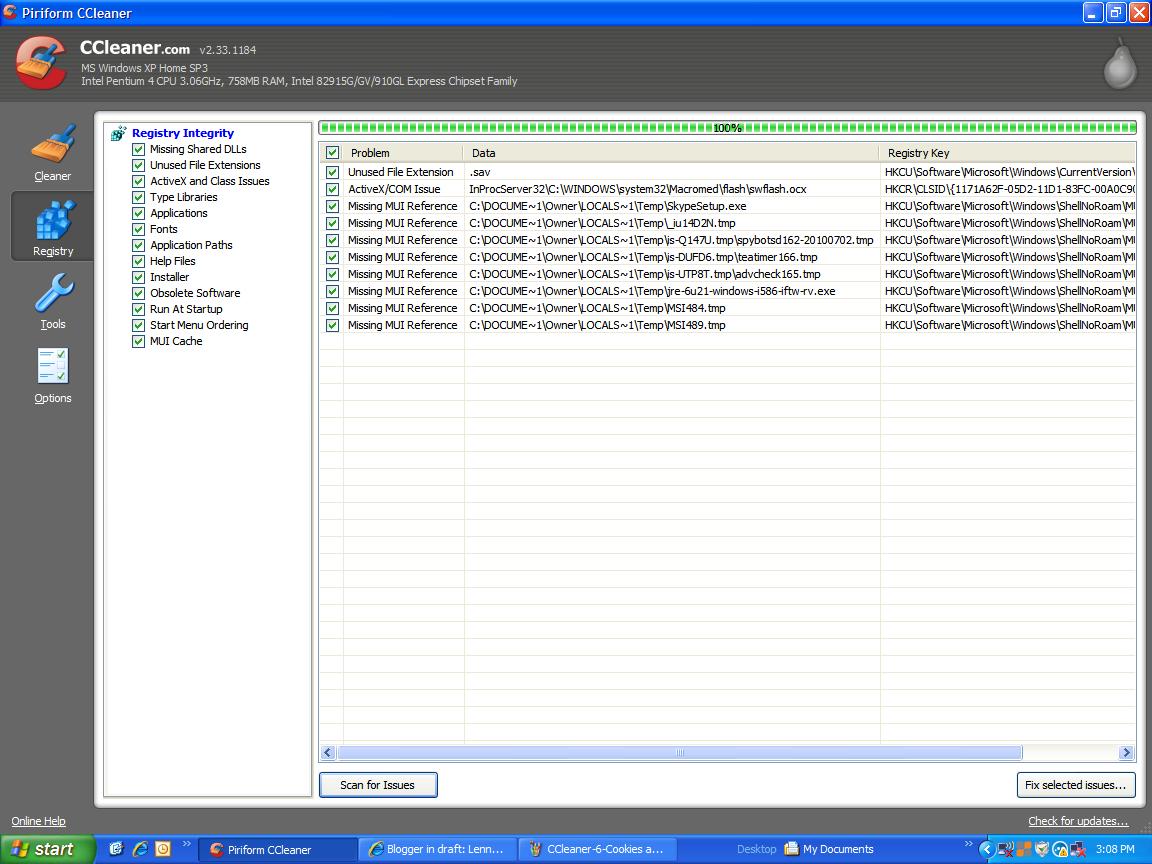
This next image, shows the Registry Section and I've already clicked the Scan For Issues button.


This next image shows how I've Cleaned the 10 Registry Issues that CCleaner found when it scanned my Registry.  Please note that I also use WinASO Registry Optimizer or the online scan from Windows Live OneCare to scan and fix registry entries. 


Well, that's how I use CCleaner on a Daily basis for Cleaning out my browser's temporary internet files, cookies and flash cookies.  If you have any questions, please feel free to post a comment below or you can go to the CCleaner Help section or their own forums.

Update - September 07, 2010 - VIEWING SYSTEM RESTORE POINTS

Click the Tools Button on the left side, then the System Restore button and you can view all System Restore points saved on your computer so you have a better idea if you have as many as you may think you have.  If you don't have enough (and enough is a user preference), then you should increase the amount of hard drive space that is allocated to System Restore.  See my blog about System Restore for details.  One of my computers only has about a weeks worth of restore points while my other computer has almost a months worth of restore points.  Most folks actually have too many SRP's since the default setting for System Restore is to use 12% of a hard drive for SRP's and with modern hard drives being so much larger than in the past, this can result in dozens and dozens of SRP's instead of the 10-30 that should be needed by most people.  I use CCleaner once a week or so to look at the number of SRP's I have and then save the oldest one and then Remove every other one except I save the most recent 3-5 SRP's since those would be the ones most likely to ever be needed in the event there is an issue.  Usually an issue that needs to be fixed with a System Restore will only have to go back a day or two since most folks would see things are not right in that period of time.  In the rare case where someone would have to go back longer than that, they would still have every other day's SRP point saved going back a month or more.  On my computers with HD's around 100GB or larger, I set the System Restore memory at the lowest point, 3%.  On my oldest computer that I still use, which only has a 16GB hard drive, I do allow that one to stay at the default level of 12% but I do use CCleaner to remove the every other day SRP's to allow for the up to a month's worth of SRP's on that computer.

I hope this helps!

Lenny Vasbinder

-----------

Please feel free to leave a comment below.  Click the Comments link if the Comments section is not already open.

Why You Should ALWAYS Do A Custom Install Of Any New Programs... So You Don't End Up With The Toolbars From HELL Browser

http://tinyurl.com/ALWAYS-Do-A-Custom-Install

(CLICK ON EITHER IMAGE TO SEE IT FULL SIZE)

(CLICK ON EITHER IMAGE TO SEE IT FULL SIZE)

The top image was from someone I was helping to clean up their computer.  The bottom image is from an online forum "friend" that showed me their worse case customer.  Neither of these customers knew about the F11 key, which will compact all of the toolbars of a browser to give you more web page viewing real estate on your monitor so they only had an inch or two of web page viewing and had to scroll down one or a couple of lines at a time to read a website.

Now... for the way you SHOULD install a new program... to make sure you avoid this toolbar HELL situation.

After downloading many common programs, during the initial installation process, the program almost always offers you the choice of doing a custom installation or their "recommended" installation.  ALWAYS choose "custom" as many programs, as part of being FREE, have various add-on's installed when installing the main program.  Other companies pay to have their program added-on or piggybacked onto the main program you actually wanted.  Oftentimes, these add-ons are one of the many toolbars or search bars offered by all of the legitimate BIG companies like Google, MSN/Bing, Yahoo, etc.... but many other toolbars or add-ons are from smaller and sometimes less scrupulous companies, many times being actual spyware, depending on what program you downloaded and installed. 

Legitimate programs like various computer security programs (most antivirus, antimalware, antispyware), Adobe Flash, Sun Java, instant messengers, media players, etc., will offer various add-on's but give you the option to un-check them during the regular or custom installation process... and in my opinion, UNLESS you absolutely have to have the toolbar or add-on, you SHOULD UN-CHECK them since more than one toolbar and too many add-ons will start to cause problems with your browser and cause you to suffer from much slower web surfing or your browser will constantly freeze up or have other issues.  They will also use up a lot of your computer's resources and/or slow down your computer.

Some of the less scrupulous or outright malicious companies will add-on a malware infested toolbar and will not even tell you they are doing it during the installation... or seriously misrepresent what it does.  This is why you should ALWAYS Google or search for more information about any program you are going to install on your computer... BEFORE you install it and then find out it's a program from HELL with yet another toolbar or add-on from HELL.  Malicious add-ons will hijack your browser's home page and/or add adware that will only send you to sites that are part of their advertising network.  Other malicious add-ons will install trojans, viruses, spyware, adware, etc., on your computer and you will have to spend hours cleaning all the crap off of it.  Until you do, your computer could become part of a bot-net where the masterminds of the malware are using your computer and surfing habits to track everything you are doing on your computer... or to send spam, send out infected emails trying to infect others, or they will go through your computer looking for banking information or other personal information and steal your identity.

I hope this helps save one or two people from the BROWSER TOOLBAR FROM HELLLLL!!!!!!

Lenny Vasbinder

------------

I welcome your comments.  Please click the Comment link below if the Comments section is not already open on the page.

Internet Archive Wayback Machine... And How It Saves Copies Of Closed Down Websites

I've written about and used the Internet Archives Wayback Machine many times in the many forums from hobby to computer tech forums that I participate in on a regular basis but I've been seeing MORE and MORE websites shutting down in the past two years so I wanted to write this short article to inform people of how the Internet Archive Wayback Machine (IAWM) works so you can find information from any of your favorite websites that have gone away.

There's a couple of ways to get to the IAWM.

http://archive.org/ - The home page for the Internet Archives, then on that page, right near the top middle, you'll see a section about the Wayback Machine, where you can enter a URL (website address aka a link) into the field and click Enter or click the "Take Me Back" button and it will bring you to a page of dated links for every snapshot that the Wayback Machine has concerning that website URL.

The other ways to get directly to the IAWM page is:

http://www.archive.org/web/web.php  or the advanced search page, http://web.archive.org/collections/web/advanced.html.

Here's how it works...

I use to publish articles on a free Yahoo website called GeoCities but Yahoo decided to close down GeoCities in 2009 so folks no longer have access to their web pages unless they know about the Wayback Machine.

Here was one of my original GeoCities links (which no longer works)...

http://www.GeoCities.com/LennyVasbinderPI/Politics_Start

Of course, clicking that link brings you to a page saying the site no longer exists.

Now, if you go to the IAWM and copy/paste or type that URL into the blank field and click "Take Me Back", it will bring you to this page, http://web.archive.org/web/*/http://www.GeoCities.com/LennyVasbinderPI/Politics_Start, where you will see a series of dated links where the Internet Archives Wayback Machine took snapshots of my web page between 2002 and 2006, which would have been the last time I updated that site since I started using Blogger Blogspot's to post my blogs/articles since then.

Other websites that have been archived include many of the articles on MSN Groups when Microsoft decided to close them down in 2008.

For my fish keeping hobby, at least three LONG-TIME very good websites have shut down in the past two years, http://www.aquatic-hobbyist.com/, http://www.plecofanatics.com/ and http://www.plantgeek.net/ but most, if not all of their articles and many of their forum threads are preserved on the Internet Archive Wayback Machine.

I never did use AOL (aka AOHell to many) but I know that AOL shut down millions of web pages in their "home town" section, at least I think that is what it was called, and many AOL members complained viciously when they lost all of their web pages, online photo albums (which reminds me that Yahoo shut down Yahoo Photo Albums a few years ago when they bought out Flickr.com), etc... so hopefully, any of those folks that thought they lost everything might be able to find some of their data and/or pictures using the Wayback Machine.

All that said, some websites prevent search engines from crawling their pages and for those websites, the IAWM may have also been blocked from crawling the website which means all data may be lost forever in those cases.

I'll probably be adding to this article from time to time so check back... or if you have any questions, please feel free to leave a "Comment" below (click the Comments link at the bottom of this article, if the Comments box isn't already open).

Lenny Vasbinder

-----------

You can click on the Comments link below to open the Comments section to leave your comments.

My Review Of Mozy Home Online Computer Backup Program - Archived Blog - 2010-0509

Updated - August 26, 2010
(Update - August 28, 2010 - Coming Soon!!! My Review of the new and improved Mozy Version 2. I'll add a link here once I complete the review page... complete with LOTS of screen shots of every step involved in setting up Mozy and doing your first backup.)

Get Mozy Home for FREE here, with BONUS online backup storage. When you get to the main page, click on Products, then Mozy Home, then click Download button or on the left side, next to the FREE sign, click "Learn More" or the "Try It Free" button. Any of those steps will get you the FREE Mozy Home version with the BONUS 0.25 GB's of online backup storage. While the UNLIMITED online backup storage is only $4.95 a month, the FREE 2.0 GB's of online backup storage becomes 2.25 GB's by clicking this link... enough storage for thousands of pictures, music and other backup of your important files.  If you have any trouble signing up for the FREE MozyHome version, just send me an email or IM me at my IM addresses to the left and I'll help walk you through thr process and getting you set up with your first backup.  Mozy also has user forums if you'd rather go that route.

Based on an email from a fellow member of the Outlook-Users Yahoo Group, I replied with a rather long reply about Mozy and it ended up being more of a review so here it is...

-----Original Message-----
From: Steven T
Sent: Wednesday, December 23, 2009 12:04 PM
To: LNVTM1 - Lenny Vasbinder
Subject: FW: Outlook 2007 with Business Contact Manager - email issue - OFFLIST

Lenny

I want to ask you about the "Mozy" add you have in your mails. I am not interested in how online backup works, only online restore ;>) What is your experience with restore from them? At what speed etc....


TIA

Steven T

AND MY LONG REPLY/REVIEW:

-----Original Message-----
From: LNVTM1 - Lenny Vasbinder
Sent: Wednesday, December 23, 2009 2:01 PM
To: 'Steven Teiger'
Subject: RE: Outlook 2007 with Business Contact Manager - email issue - OFFLIST

I've only had to use the restore a couple of times over the past several years that I've been using Mozy (I was involved in the initial Beta testing).

Most recently, I had to restore my Favorites folder in IE8 (currently 10.3MB, 2,662 files, 332 folders). I started using XMarks a few weeks ago, to synch my Favorites folder for IE8 and FF on my laptop and desktop so they would all have the same Favorites/Bookmarks and when I first did the XMarks synching, it (or rather I) completely messed them up... and I mean a major SNAFU, mostly due my not setting XMarks properly or rather not understanding the instructions properly.

Fortunately, I had my Mozy online backup of my Favorites folder on my desktop computer, which was done about an hour before I did the XMarks installation and fouled up the sync so bad. I uninstalled XMarks on both computers, emptied my Favorites folder on my desktop and then used Mozy to restore it. Mozy actually keeps several *copies* of backups... kind of like restore points... so you can choose which date/time you want to restore to. It didn't take long... maybe 10 minutes or so... I didn't time it but it wasn't long. I have over 2,500 URL's saved and well organized in my Favorites folder and all of it's sub and sub-sub folders.

As far as the speed, it depends on your own internet speed and what else you are running. If you shut down all other programs that might be using up internet bandwidth, then Mozy will be MUCH faster and I'm pretty sure it will download the restore as fast as your bandwidth and computer can handle. I've NEVER seen any slowdowns related to Mozy servers... only my own bandwidth limitations, especially if I have all three of my computers working on the internet on my DSL line.

Of course, uploading the initial backup and even my twice daily scheduled backups takes much longer than a restore since most internet access has much slower upload speed than download speed. My average online backup on my main computer takes about an hour or two, depending on how many new files I've added. I use the scheduled backup, rather than the constant backup, so I can have each of my computers backing up at different times so I do not see as much slow-down in my internet speed. If all three computers were backing up at the same time, I see a BIG slowdown in my internet service since Mozy would be using so much of my upload bandwidth.

Mozy also uses a moderate amount of system resources during the Backup process on my two oldest computers... one with only 384MB of RAM and the other with 768MB of RAM. I do not notice any slowdown on my newest Vista-HP laptop with 3Gigs of RAM.

Folks get 2Gigs of FREE backup if they sign up at Mozy.com or if someone signs up using my referral link, in my sig, they actually get an added .25Gigs (256MB). I know 2Gigs or 2.25Gigs isn't a lot of storage but it's usually more than enough for most of the people that I've helped install the free version, as long as they pick and choose which files/folders to back up. I actually only use up around 6Gigs of backup on my main computer, just to backup My Documents folder, my active PST file and certain other folders (like Favorites). I use an external HD to do weekly backups and clones of all three of my computers for major issues and just use Mozy for backing up my most active files/folders. Once you are a Mozy user, you can get your own referral code and get extra storage each time one of your friends or referrals sign up for the FREE MozyHome 2.25GB service... or if they decide to sign up for the $4.95/mo. unlimited service.

Sorry.. I didn't mean to write an entire review of the program but I really like it and think everyone should have at least the free version of Mozy to back up their most important files, photos, etc. I've read so many horror stories online and with helping my friends with their own computer problems.

I might have to use this for a blog article about Mozy. LOL

Lenny Vasbinder

FREE and automatic online remote backup of your documents, photos and files...
https://mozy.com/?ref=46UUG1 Check out how simple and secure it can be to use the Mozy remote backup system. Mozy will back up your most important files and folders every day/night while you aren't using your computer.


-----------

You can click on the Comments link below to open the Comments section to leave your comments.

Toggle Flash - A very good and simple and FREE solution for Adobe Flash IE freeze-up problems - Archived Blog - 2009-0108

Recently, while helping someone in the PCPitstop.com forums, where they were having problems with IE (Internet Explorer) freezing up, I let them know that the likely cause was Adobe Flash 10, which came out late last year (2008) and has been causing IE freeze-ups to many users. I directed them to a few other threads in the MS forums and even the Adobe Flash forums. They reported back and thanked me for telling them about Toggle Flash... but unfortunately, up until they thanked me, I had never heard of Toggle Flash before. I went and read the threads that I had directed them to and further in the threads, another poster mentioned Toggle Flash as a simple solution to the Adobe Flash freeze up problems.

It's a simple add-on to IE and with the click of a button, you can turn off the Adobe Flash add-on and then surf to your heart's content without seeing any Flash advertisements or see your IE, possibly with many tabs open, freeze up and then you lose all of your open tabs before you had a chance to read or save those pages as favorites... this has happened to me many times and then I'd have to go into my IE History and recreate my searches.

Anyhow... I decided to read up on Toggle Flash a little and then I installed it a couple of days ago from the main site at http://flash.melameth.com/togflash.html.

Here is what I've had to say about it so far in forums and emails to the developer of Toggle Flash, Daniel Melameth. I should note that he was very quick to reply to my email inquiry also!!!

FIVE STARS for that!!!

----------------

"(rgsmile @ 8:39pm Mon Jan 5 2009)

Thanks. The link, in LennyVNOLA's previous response , (I am now using Toggle Flash (freeware add-on for IE7) quite successfully: http://flash.melameth.com/ might be worth a look for me and others. Thanks to all that responded.

rgsmile"

My reply to rgsmile....

Well... after IE froze up on me last night with a lot of tabs that I did a lot of work to find and hadn't saved yet... thank God for the History search.... but anyhow.. I went ahead and downloaded and installed Toggle Flash and haven't had an IE freeze up today and I've done some serious surfing today.

The only negative thing that I can say about Toggle Flash is that it doesn't tell you whether it's off or on so you have to go to your favorite YouTube or other known flash site to see if you left it off or on before you do your major surfing so you don't get surprised with a freeze up.

I'm going to email the author of Toggle Flash and see if there's a way for the icon to display whether Toggle Flash has it turned off or on.

I did have to go into my View Menu, then Toolbars and unlock the toolbars, then close and reopen IE to get the Toggle Flash Icon to show up which the main site explains about anyhow. You might also have to go into your Manage Add-ons and enable it if you have your settings to block add-ons.

Another thing that happens... at least with me.. is each time I do a Toggle Flash, I get a little black Command Prompt window that pops up and then disappears. I didn't check the Toggle Flash site but I guess this is normal.

It works for me so far after 18 hours of power surfing.

Lenny V.

------------------

Here are my emails to/from the creator of Toggle Flash...

January 7, 2009

Daniel@Melameth...

I just started Toggle Flash and I'm glad to be free of IE freeze ups caused by quirky Flash programming.

I have a couple of questions...

Is the Toggle Flash button on the IE toolbar supposed to indicate if TF has Flash turned on or off? Is there a way other than to test it to see which mode it is in? For now, I've been just going to YouTube to check and see which mode I left it in but it would be nice to know at a glance.

Thanks for a good product.

Lenny Vasbinder

------------------

His reply....

January 7, 2009

Hey Lenny,

Unfortunately, at this time, the toolbar button just activates the toggle feature--is it not an indicator of the status of Flash. This is on my list of things to do for a future version of Toggle Flash, but Toggle Flash is extremely simple right now and getting the toolbar button to change based on the status of Flash is, actually, far more complex. As for determining the status of Flash, if you go to a page with Flash content, but Flash is disabled, IE will notify you of this in the Status Bar on the bottom of the page with an image of a little red no sign on top of a little silver cog--which is made to represent an Add-On that the site is trying to use is disabled.

I tend to always browse with Flash disabled, and only enable it when I specifically want it, so determining the state of Flash is somewhat easier for me in this case, but this is, by far, the most requested feature of Toggle Flash and I'm definitely taking it into account.

Thanks for taking the time to share your thoughts on Toggle Flash.


Cheers,

Daniel

------------

In February, 2009, Daniel sent me an email notifying me of some upgrades that were made. Here is his email.

-----Original Message-----
From: Daniel Melameth
Sent: Wednesday, February 04, 2009 6:58 PM
To: 'NHSNOLA'
Subject: RE: Toggle Flash


Lenny,

I remembered your email and thought I'd drop you a little note to tell you I recently made a minor update to Toggle Flash to address a compatibility issue with IE8 and, while I was here, I also changed the executable so that it no longer opens a Command Prompt window when clicked. As such, feel free to download the updated installer from the site. In addition, it appears Microsoft has given IE8 the ability to control which sites can use a specific add-on and I'm considering leveraging this feature for a future version of Toggle Flash.

Sincerely,
Daniel

How I ALWAYS do a clean install of Yahoo Messenger (YM) on Windows XP, With Updates For Vista And Windows 7

NOTICE - This was originally published on my other general purpose blog back in 2007 and has been updated many times since then.  I have moved a copy of the original to this blog and will keep this blog updated from now on and will add a link to this page on the older version of this blog.

http://tinyurl.com/How-I-ALWAYS-Install-YM

Edit/Update -
April 21, 2011 - Lots of people are having problems with their IM's not showing up... this is related to Java not being updated and working right in your IE browser.  This is covered right below the Quick Steps.
Sept. 20, 2010 - Info on running Check Disk on your primary hard drive.
September 11, 2010 (God Bless America - Always Remember 9/11 And Never Forget The Terrorist Attacks)
Sept. 11, 2010 - Two links added at the bottom for other reference sites.
July 17, 2010 - Added "Quick-Steps" to the top of this post;
June 24, 2010 - added new location for Yupdater.exe file;
May 08, 2010 - added an email sent to someone with some info;
April 14, 2010 - fixed a link;
January 31, 2010 - to add more info about using Revo Uninstaller and to add info for Windows Vista and newer YM versions;
Many other updates prior.

Quick-Steps To Summarize The Below Information:
(NOTE: Create A Restore Point before each step if you are unsure of your computer tech abilities)
1. Uninstall Yahoo Messenger (YM) using the Revo Uninstaller. Save a copy of your Archives folder if you keep archives of your chat sessions. Turn off and re-start computer.
2. Run CCleaner Registry Cleaner (or WinASO or other legitimate registry cleaner)
3. Run Secunia Online Scanner to see if it finds any OLD remnants of YM.
4. Make sure you have updated versions of Adobe Flash Player and Sun's Java browser plugins for Internet Explorer, preferably version 8 (mainly for use in the Chat Rooms, not as much for YM)
5. Download a FULL sized version of YM from FileHippo.com or your preferred download site, to your desktop or preferred download folder.
6. Turn off and re-start your computer and make sure IE is working properly, including the Java and Flash sites.
7. Go to your downloaded FULL sized version of YM and run the .EXE file to start the installation. You may not want to install any toolbars or other add-ons that Yahoo may have included in the download. DO NOT RUN YM YET.
8. Move your copy of your archive folder back to where it should be.
9. Start up YM and go through all of the Preferences Menu setting things up how you like them since the above steps would have removed all of your previous settings.
10. Start IM'ing your friends, testing all of the features and go to Chat Rooms to make sure things are working well. If they aren't, leave me a comment below or go to the Yahoo Messenger Yahoo Group (link in next paragraph), join the group and post your questions there.

Here's something that should fix the invisible IM's issue that many are seeing.

You probably changed your javascripting settings in IE so try this fix...
When you send/receive an instant message and no message appears, you most likely have Scripting disabled in your Internet Explorer.

To enable Scripting:
Click the Tools menu on your Internet Explorer toolbar and select Internet Options.
Click the Security tab.
Click the Internet (globe) icon and click the Custom Level button.
Scroll down to Scripting. Enable the following:
Active scripting
Allow paste operations via script
Scripting of Java applets are all enabled.
Click the OK button at the bottom of the window.
Please Note: Restart Messenger and you should start seeing text in your IM windows once again.

Following is a message and amendment that I posted in one of my Yahoo Groups, http://groups.yahoo.com/group/Yahoo_Messenger, back in May 2007 but I've been meaning to post it to my blog as well so here it is about five months later! And I have updated this article many times since.

Sent: Thursday, May 31, 2007 10:21 PM
To: 'Yahoo_Messenger@yahoogroups.com'
Subject: How I ALWAYS install Yahoo Messenger on Windows XP

Hi YM Group,

I thought I had done this before but after someone contacted me off list, I searched through the archives and couldn't find my post so I guess I've just added bits and pieces of this information in various replies over the years but here is how I prepare my computer before downloading a new version of Yahoo Messenger (YM).

Uninstall old version of YM using Add/Remove programs for the YM uninstaller. Reboot computer. OR BETTER YET, use the Revo Uninstaller and use it's default settings to find and remove a lot of the junk that the normal YM uninstaller leaves behind. http://www.revouninstaller.com/ Go through each step and delete the files and registry keys that it highlights and recommends except you might want to save a copy of your archived chats and other archived info as mentioned later in this article.

Reboot your computer after each step in this article.

Run a GOOD registry cleaner. I use and recommend WinASO Registry Optimizer http://www.winaso.com/download.htm which is FREE to download and use as long as you like, but the trial version has a limitation that is more of an annoyance than anything else, in that it tries to get you to pay for the unlimited version but if you don't mind dealing with the annoyance, it works as good as the paid version. I've been using the FREE trial version for several years since version 1.0. I've never had a single problem using it to clean and optimize my registry. The downside/annoyance of the free trial version is that it will only clean 10 items each time it is run. The first time you run it, you may find several hundred items that need to be fixed so you will have to run it dozens of times.  OR BETTER YET, you can run CCleaner's Registry Cleaner option, http://www.ccleaner.com/, to get rid of most of the junk and then follow it up with WinASO (FREE version) to do a full cleaning since it does a better job than CCleaner. After that, if you run WinASO 1-2 times a week, it will be much quicker, easier and keep your computer from being bogged up as much with junk. After cleaning/fixing your registry, reboot your computer.

Another FREE registry cleaner is offered as an online scan from Microsoft by going to the Windows Live OneCare Safety Center http://onecare.live.com/site/en-us/center/cleanup.htm and run the Clean Up scan.  You will have to allow a small download for the scan to run and you may also see the new Microsoft Security Essentials advertised on that page.  For an MS product, it's getting rave reviews from many in the computer tech and security industry. It's not needed to use the free scans and it's not as extensive as other FREE security software that is out there but it is an easy to use security program for folks that do not want to learn the more sophisticated security programs.

Now download and SAVE (to "desktop" or your favorite file folder for saving things where you can find the download after you reboot) the full version of Yahoo Messenger from http://www.filehippo.com/download_yahoo_messenger/ or your favorite safe program download site. DO NOT chose "RUN" during the download and DO NOT RUN or execute the full version after it is downloaded. The full version of YM is around 10-15MB (depending on which version) in comparison to the Yahoo Messenger "official" installer that is only around 484kb when downloaded from http://messenger.yahoo.com/ I find that the Yahoo installer will have more problems especially if someone has a strong firewall or slow internet connection.

It's this "installer" version that causes so many problems, IMO. Because when you run it, it then starts downloading other bits and pieces of the program and if there are any glitches in your internet service or with Yahoo servers (and we all know there are those! ;-\), you can end up with a bad download with various bugs. When you download the full version from FileHippo or another download site, after you download it and get ready to run it, there should be Publisher listed, which should be Yahoo! Inc in a blue link which is to a digital verification site to verify that you have a legitimate version of the program. This works for most programs you may download although there are many that will not have this digital verification capability and when you go to execute one of these "unsigned" programs, you will get a little warning message on the box. If I know I downloaded the program from a reliable site, I don't worry about this but if you are not sure, you should never run a program without a digital signature attached. Many other programs have a way to run a check-sum on the download to make sure you got the download in full without errors but I've never seen this available with YM. Usually, if you have the digital signature, it means things went smoothly and you have a full version without errors.

If you use CCleaner, you should run it now to clean out your temporary files and TIF files. I am not going into all the aspects of CCleaner in this post but for most folks, it can be a problem to remove things they did not want cleaned if they do not go through and become very familiar with the program. It will clean auto-complete info, search history, cookies, etc., when used in the default mode. The CCleaner Registry Cleaner is OK to use in default mode but the rest of CCleaner should be understood before running or the user could lose information that they actually wanted to keep. This is why I like WinASO as a registry cleaner. Even a rookie can run the registry optimizer without causing problems to their computer... at least it's never caused me problems in hundreds of times of running it.

If you don't use CCleaner and did not use the Windows Live OneCare Safety Center Cleanup Scan, you should use your web-browser Tools to empty the TIF files. Then run a Search on your computer for all temporary files and remove them manually. If you don't know how to do this, then you should download CCleaner and become familiar with CCleaner and use it for this purpose or use the Windows Cleanup online scan. Feel free to ask me here and I'll tell you how I have my CCleaner set up to run it daily to keep the junk files off my computer.

Reboot the computer and leave all other programs turned off except for anti-virus and firewall.
Then, if you downloaded YM full version to your desktop, simply click on it to execute the program. If you have a firewall, you should get a pop-up asking for access, from the YM program installer, to the internet and other areas of your computer. Permit this and if you use an advanced firewall (which you should be using over the Windows Firewall which isn't very good), put a check mark in the box to allow it on a permanent basis. You can always go back to the firewall user interface and delete this permission later if you want to.
Choose the "CUSTOM" install instead of Yahoo's recommended install. This makes sure that all you install is YM and not all the other junk they try to get you to install like tool bars, etc. I choose CUSTOM install on ALL programs that I install on my computer to make sure I don't install junk I didn't want. The CUSTOM install still gives you the option to install other things but it doesn't force them on you without your knowledge. This is common practice on all FREE programs as a way to help them pay for their free program. Google, MSN, Yahoo and other companies pay to have their toolbars and desktop search programs included in the downloads. Reputable download sites and programs give you the option of opting out of these add-ons.
Now, once the YM program is installed on your computer. Reboot again.

Rebooting is important to computers as it's a way of letting the computer put everything back into place. If you are in the habit of leaving your computer on for days at a time, if you find it getting sluggish, a reboot will normally speed it back up again.

Now start up YM and go through your preferences, setting things to work how you like them. Become familiar with the Messenger Menus and the Preferences Menus and ask questions here about anything you may not understand.

The last thing that I do with any new install of YM is go into the C:\Program Files\Yahoo!\Messenger folder (or for version 10.x, the Yupdater.exe is now located in C:\Documents and Settings\All Users\Application Data\Yahoo!\YUpdater and find the file Yupdater.exe and change the name to Yupdater-NOT USED.exe. You can also use your firewall to simply block Yupdater.exe from connecting to the internet but many folks do not utilize their firewalls in an advanced mode so Yupdater.exe would have access unless you went into your firewall and blocked it. This way with changing the file name, your installed version of YM will not automatically update to any newer release of YM without your express consent as YM will not find the Yupdater.exe file when it tries to contact Yahoo like it will do on a regular basis if you don't block it or change the file name. YM 10.0x does have a section in the preferences that allows you to check off saying that you do not want YM to update automatically and I have that checked off but I still change the Yupdater.exe file as well.

If you decide you are not happy with your current version, you can then repeat the steps above and download a more recent version and install that version. I've found that allowing Yupdater.exe to connect to Yahoo, it constantly stays in contact with Yahoo whenever YM is in use. I've verified this with my firewall. I'm not sure why an updater process would need to stay in constant contact with the manufacturer. Even my Antivirus, Antispyware, etc., only contacts their updates once a day for new malware definitions. None of my other programs on my computer stays in constant contact for updates. They either run on a monthly basis or some other time interval. Certainly, Yahoo isn't releasing daily updates so YM should not need 100% access to Yahoo servers, IMO.

Hopefully, if all went well, your newly installed or reinstalled version of YM will be much more stable and cause less problems for you and you will not need to update to new versions as often.
I still run YM versions 8.1x, 9.1x and 10.0x and they are very stable on my computers compared to some of the stories I read about daily and with the people I help on a daily basis here and on other forums and my friends and neighbors that used the Yahoo Installer.

I hope this helps and feel free to ask any questions you may have. I'll probably put this on my blog with some screen shots of WinASO and CCleaner and how I have my CCleaner set up so it does not clean things some people actually want to keep and I'll post a link when I do.

Ooops. I almost forgot one step. It may not be critical but it could cause you to lose your archived chats if you have YM set to save them.  Before uninstalling and cleaning up your computer with Revo Uninstaller, WinASO, CCleaner and Windows OneCare Cleanup utility, for XP, go to C:\Program Files\Yahoo!\Messenger\Profiles\(your yahoo name)\Archive and copy both of the folders in the Archive folder.  For Windows Vista and Windows 7, the file path is C:\Users\\AppData\Local\VirtualStore\Program Files\Yahoo!\Messenger\Profiles\.  There should be a Conferences and a Messages folder.  Just copy and save them to your desktop or your other favorite place to save things.

Usually, during an uninstall and reinstall of YM, using the standard uninstaller, these folders are left in place but in the past, if I had a buggy YM install, I would sometimes go and delete the entire Messenger folder (C:\Program Files\Yahoo!\Messenger) (and the AppData folder for Yahoo!\Messenger in Vista/W7) to make sure I get rid of all traces of the buggy version. By saving copies of the Archive folders, I can move them back into their proper place after a new clean install. If you go to this extreme of removing everything associated with YM, make sure you run WinASO, CCleaner and Windows OneCare Cleanup utility before doing the clean install of the new full version download.


Hope this helps!

Lenny Vasbinder

Here are the emails that I mentioned in the May 08, 2010 Update:

-----Original Message-----
From: J
Sent: Friday, April 09, 2010 10:46 PM
To: lnvtm1@gmail.com
Subject: I'm back!!

High Lenny,

Thanks for the 2 sites you gave me to uninstall and check for updates, really good ones.

I did the complete uninstall and downloaded the latest IM 10.x and the scan said it was perfect, it also picked up 3 earlier versions of yahoo that are lying in my registry that uninstall has not removed. How do I identify that and erase it?

I have copied the new IM 10.x to a flash drive and am going to uninstall the sytem again and reinstall after I have erased the old Im's, as I still have the same display problem at 480 x 800 ech time I log on. Added to that, my cam works on IM, but when I choose a room it won't connect, just says getting room list and stays dead, so it's got worse damnit.

Thats why I want to start fresh again, also I now get a add on notification on any site saying website wants Adobe flash player wants to be added on. I have okayed it and run it but nothing changes the system and it keeps on appearing.

I have also checked my add ons in tools and they are all enabled.

So once again, would you kindly give me your thoughts?

regards,

MORSELS / Jerry

And my REPLY:

-----Original Message-----
From: LNVTM1 - Lenny Vasbinder
Sent: Friday, April 09, 2010 11:32 PM
To: 'J'; 'Yahoo_Messenger@yahoogroups.com'
Subject: RE: I'm back!!

Hi Jerry,

See one of my previous replies. After you did the FULL install of YM, did you check the YahooMessenger.exe file Properties>Compatibility Tab, to make sure that you don't have a check mark in the display settings box? It shouldn't be but possibly one of your old versions has a registry key that is affecting the settings of your new download.

If that isn't the problem, I'm wondering if one of the old version or some registry remnant from one of the old version is messing things up in other ways.

Did you save the FULL download from http://www.filehippo.com/ (or your preferred download site)? If you saved it on your desktop or in a folder in your My Documents folder or however you have your computer organized, then there is no need to copy that to a flash drive. When you uninstall YM, it will not delete the file that you downloaded so after you clean things up, you can just click on that .exe file again and start the install process all over again.

When you uninstall YM 10.x, I would use the Revo Uninstaller and then follow the instructions with Revo to delete all of the leftover registry keys and program remnants. See my blog article for more details.

Then run the Secunia Online Scanner again and see if it finds any remnants of the old versions of YM. If it does, it will actually list the file path to where that remnant was found and you can just follow that file path and just highlight and delete the files. OR... after running Revo, you can just go to your C:\Program Files\Yahoo!\Messenger and delete the entire Messenger folder but you may want to go through that folder and only delete the things you do not want to keep. For example, I save my archived chats so I move those Archive folders to My Documents folder and then move them back to their proper place after I install a new version. For Windows XP, the Archive folder is in the above file path.

For Windows Vista and Windows 7, the file path is:
C:\Users\\AppData\Local\VirtualStore\Program Files\Yahoo!\Messenger\Profiles\

If you feel comfortable fooling with your Registry, you could also search for Yahoo Messenger entries in your registry and clean them out manually, although I would use CCleaner's Registry Cleaner and then WinASO Registry Optimizer to look for and clean up any errant registry entries... and if you used Revo Uninstaller, it probably already got them all!

After things are all cleaned up, then do the installation again, check the Properties>Compatibility Tab to make sure nothing is checked there and if you are still having monitor issues, I would have to think it's one of the other problems with a driver that needs to be updated or rolled back. See my earlier reply for some of the other issues that caused monitor issues related to YM.

As far as Adobe Flash, once you've uninstalled it and removed the old remnants, using the same methods above, go to http://kb2.adobe.com/cps/155/tn_15507.html and it will check your version and http://www.adobe.com/software/flash/about/ will show an animated flash video that says "Adobe Flash Player Successfully Installed" and then change to another Adobe related Ad. If you aren't updated or installed properly, go to http://get.adobe.com/flashplayer/ (you may want to uncheck the Google Toolbar thing... I NEVER install all of the add-on software that is often pushed from many free programs) Click on Agree And Install and follow the prompts to install Adobe. Prior to doing this, Secunia's Online scanner should have told you about out-dated Flash remnants and you can follow the file paths to delete the outdated flash files that were left over from previous installations.

As far as going to the rooms, I think you have to have Java installed. Did Secunia identify if you had Java installed and updated? If you didn't, get it here. http://www.java.com/getjava/ On that page, right below the Free Java Download button, there's a link to "Do I Have Java?" so you can check it first and that will also tell you if you have the latest version.

I probably need to add some of this info to my article on doing a FULL and CLEAN install of YM since Flash and Java are often needed with YM.

Other sites:
http://www.xiirus.net/articles/article-yahoo-messenger-archive-location-in-vista-yrhm6.aspx - mostly the comments section has some good info.
http://www.ehow.com/how_5713165_move-message-archive-another-computer.html

Lenny Vasbinder


Run Check Disk (ChkDsk) On Your Computer On A Regular Basis


Quick Steps (for XP and Vista and probably for W7)

Open My Computer
R-Click on Local Disk C (or your primary hard drive) and choose Properties
Click on the Tools Tab and then the Check Now Button which opens a new window
Check the boxes for "Automatically fix..." and "Scan for and attempt recovery..."
Click Start which will open a new window that says "The disk check could not be performed... Do you want to schedule this disk check to occur the next time you restart the computer?"
Click YES, then OK out of the Local Disk Properties window and close the My Computer window. 

Then the next time you will not be needing your computer for an hour or two or more, after closing all your running programs, turn off the computer.  Then restart it and follow the instrutions, then go do something else while Check Disk (or Disk Check) does it's thing... or you can watch the first time to see it go through the five steps.


Here's more details..
http://support.microsoft.com/kb/315265  
http://www.updatexp.com/windows-xp-chkdsk.html
http://www.howtogeek.com/howto/windows-vista/guide-to-using-check-disk-in-windows-vista/

CLICK THE LINK "YAHOO MESSENGER" UNDER THE LABELS SECTION TO THE LEFT FOR MORE OF MY BLOGS ABOUT YAHOO MESSENGER
Related Posts with Thumbnails

Please Consider A Donation If This Site Was Helpful OR Pay By Google Checkout OR Pay By PayPal

NHSNOLA@Gmail.com/Neighborhood Home Services Is My PayPal Account

Emsisoft a-Squared AntiMalware Online Scan

Secunia OSI - Online Software Inspector - Scan for outdated software on your computer.

If the "Scan PC" button isn't showing, scroll down on the right of this Secunia OSI section OR click this link... http://secunia.com/vulnerability_scanning/online/

FlagCounter Added August 22, 2010

free counters

Followers